

.svg)


Already documented your security work — just not in Cyberday yet? Instead of spending hours copying information by hand from one document to another, you can now bring your existing policy and process documents straight into Cyberday and let AI do the heavy lifting. In just minutes, the tool reads your documents, recognises what you've already done, and fills it into the right tasks and guidelines automatically. That means less busywork and more time for what actually matters: improving your compliance.
The document importing feature allows you to import your existing policy and process documents and matches, fills and creates relevant content in Cyberday automatically based on what you have already done.
What is the document importing tool for?
Previously, when already having existing policy and process documentation, the process of moving the information to the Cyberday tasks, guidelines and documentation items manually was fairly tedious and time consuming, especially for large documents. This is now where the document import tool comes in: The tool allows you to completely forgo the arduous manual work of moving information from spreadsheets to individual tasks, and can fill what you have already done into the management system in mere minutes.
How does it work?
First, in the 'main documents' section of the 'files' page in Cyberday, you insert any (and as many!) existing documents you'd like to process, in a wide range of formats (PDF, DOCX, CSV, XLSX, TXT, PPTX, HTML).
Then the tool will start to analyse your documents one at a time, and this is where the magic happens:
First, the document is split into logical chunks based on its formatting. Here it will make separate sections for most paragraphs, sections under headings, tables and lists.
Then, each section's content is analysed by one of the many AI agents in the tool to match the type of content in Cyberday any given section is related to, whether it be a section related to task content, guidelines or documentation items in Cyberday. Some sections in this step are also labelled as purely informational and wont get linked to any Cyberday content because it is not relevant (the index of a document is a typical example of an informational section).
After matching the correct type of content to each section, another set of agents match the sections to the specific task/guideline/documentation item and fills their content accordingly. For each task the tool will fill the process description to match the organisation's implementation and fill guideline descriptions accordingly. Documentation matching is still a work in progress at this point and won't show any suggestions as of yet.
Once the tool is done analysing, the results will be shown in a report on the same page which displays each section of the document and the changes or additions it suggests. Each suggestion can then be reviewed and selected if it should get included in the management system.
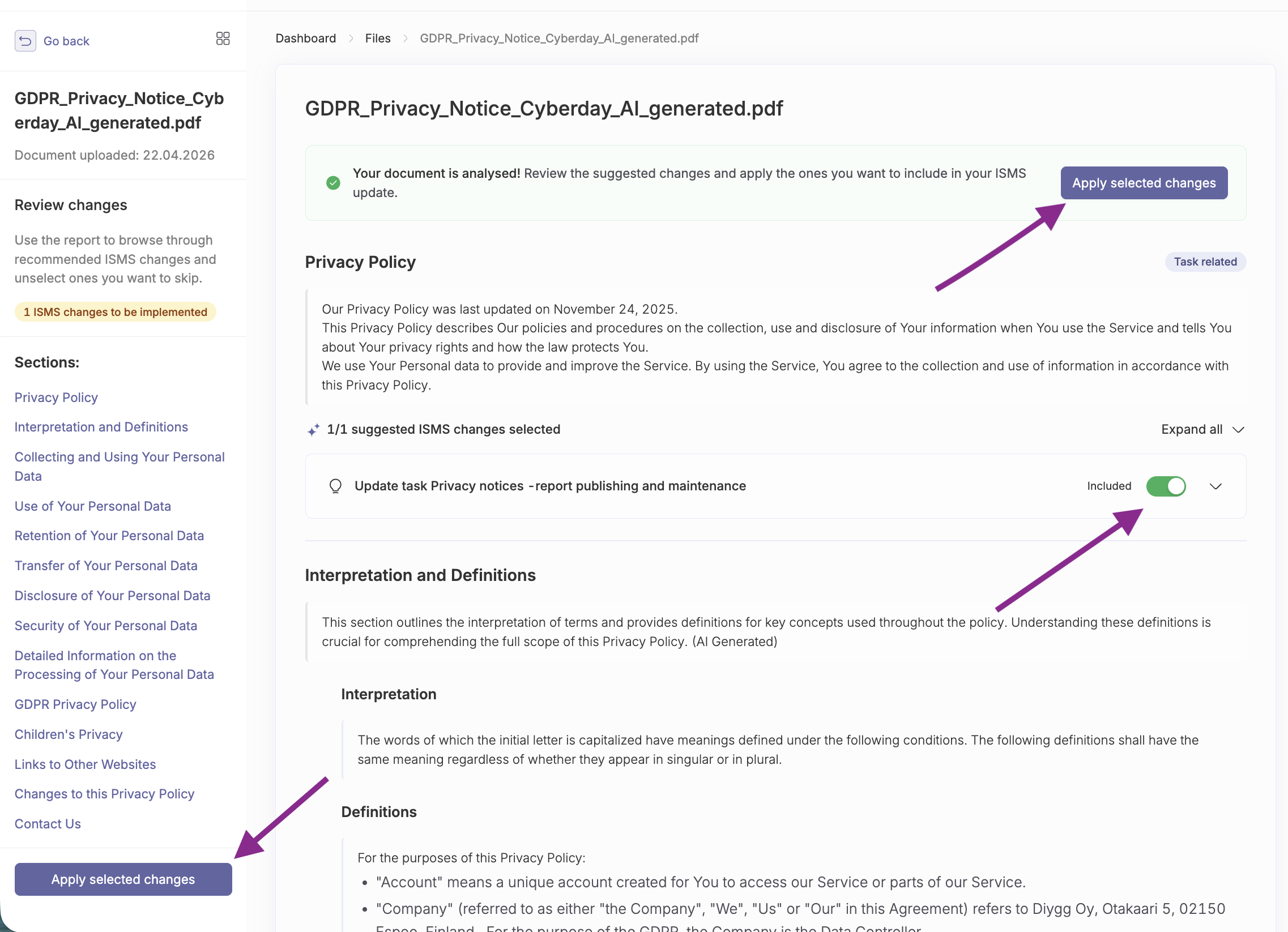
Additionally, all changes made by the document import tool will display in the logs of the items and show which document the changes came from.
Ready to skip the manual work?
The document importing tool is live now for you to try with your own policy documents. This feature is complex and always in continuous development, so any feedback from you is valuable to us. For more details on how to use the tool, see our help article.


.png)


