.svg)


TL;DR: Workflows are a clearer way to find everything related to one theme - risks, awareness, incidents, assets - on a single focused page, with the metrics that matter and the documentation / tasks / reports you need. And the pages you use today aren't going anywhere.
Something big is coming to Cyberday over the next couple of weeks, and we want you to hear about it from us first.
We've been listening. The most common feedback we receive isn't about adding features - it's about clarity. Where am I on this framework? What should I work on next? Why am I jumping between five different lists to gather everything about one topic? We've rebuilt around those questions.
The biggest change for you is workflows - a new way of grouping your day-to-day ISMS work onto focused pages, one topic at a time, each with its own metrics, recommended actions, and linked documentation, tasks and reports. The Dashboard simultaneously becomes the place that highlights those workflows and their current status, along with your framework compliance and its progress. The framework compliance view gets a small but meaningful refinement. And - crucially - everything you've already built stays. Your tasks, your policies, your reports, and the pages you've been navigating to all this time. They're all still here. We're just giving them clearer homes and better default paths for work.
The three main changes at a glance
- Workflows become the way your work is grouped - risk management, employee awareness, incident management, supplier management, internal audits, and more - each on its own focused page with the relevant metrics, quick actions, documentation, and reports.
- The Dashboard becomes your active home: framework cards at the top, workflow cards below showing their current status - so the first thing you see when you open Cyberday is where things stand.
- The compliance view gets smarter, with a per-requirement coverage status that clearly communicates the action to take related to this requirement.
Workflows: the main change for you
This is the change you'll notice most - and the one that should make the ongoing work on your management system meaningfully easier.
Risk management. Employee awareness. Asset management. Incident management. Supplier management. Internal audits. These were already in Cyberday, but they were spread across themed lists, scattered documentation, and individual tasks. To get a complete picture of what was going on with, say, risks, you had to jump between several different views. Now each of these themes is a workflow - a single page that brings everything related together.
Open the Risk management workflow and you'll see, in one place: has your risk management work been active, any recommended actions to take now (e.g. active risks without an owner or active risks to check treatment status), the documentation that backs your risk process, the open work to attend to, and the reports auditors will ask for. No more hunting across the product to assemble the picture.

Each workflow page follows the same shape - header with status, the main metric for the theme, quick actions, documentation, tasks, reports - so once you've learned one, you know how to operate any of them. The catalogue covers 5 basic workflows, 5 advanced workflows and a few ones that pop up depending on your framework choices (e.g. privacy management, AI governance, etc.).

Dashboard: Answering to is our system working?
Open Cyberday and the first thing you'll see is the redesigned Dashboard - your unified view across every framework and workflow you've activated.
Framework cards at the top show your current compliance score and trend - and encourage you to access the framework compliance view to get the big picture perspective of the framework and continue improving compliance score - also for the non-workflow connected requirements.
Workflow cards below highlight what are the main ongoing parts of your system, where each workflow stands and what needs attention. Quick actions and improvement suggestions sit in context. Also for more experienced users, we want to answer better here to "what would need my attention" and give the place you return to between focused sessions of work.

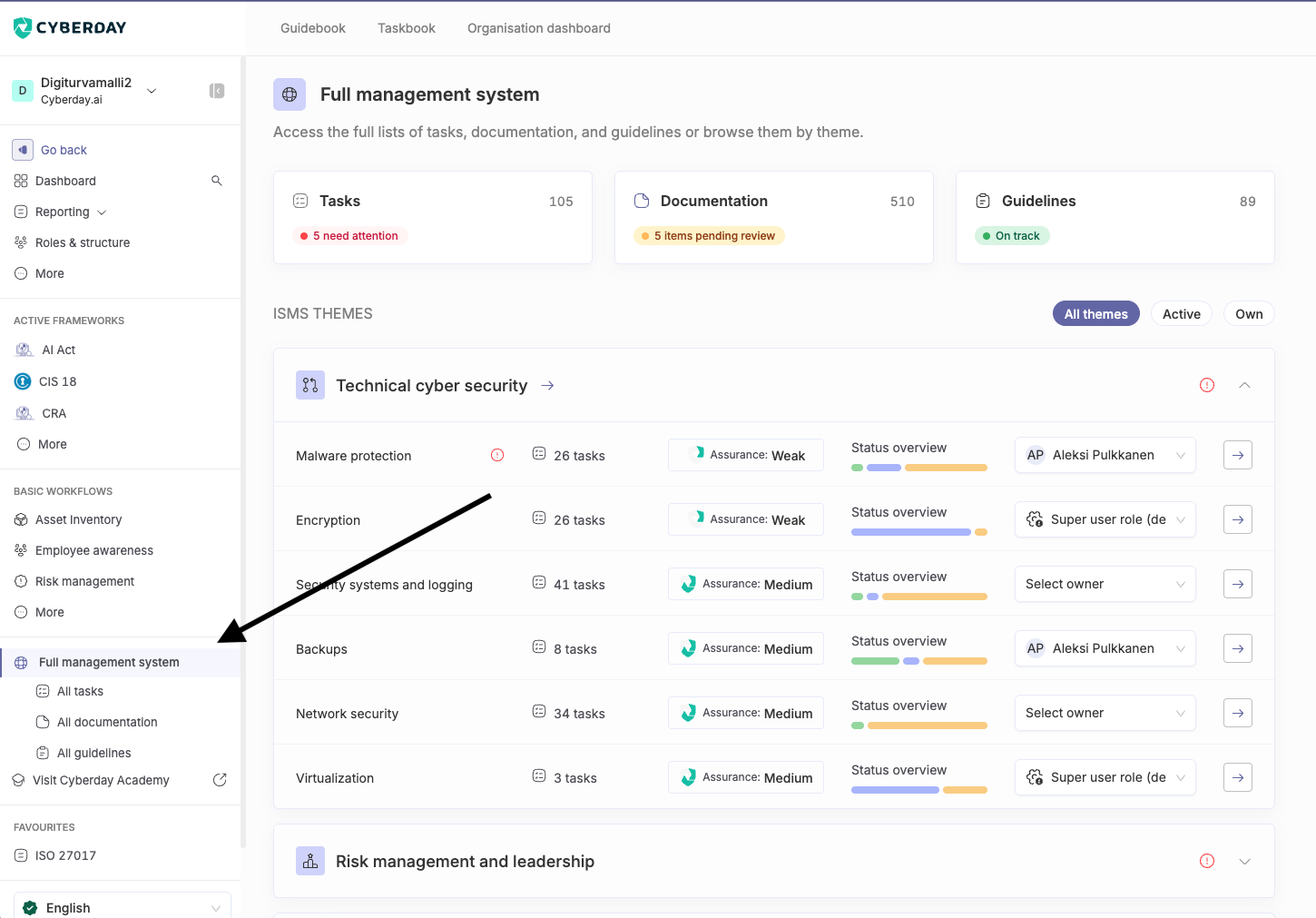
The content that lived on the old Dashboard will move behind the "Full management system" -link on the left menu. This view is very important, if you have many frameworks active and wants to see the full output (e.g. all policies that have gotten created), or you want to review the whole system at once, outside the context of a specific framework or workflow.
Otherwise the left menu now highlights the compliance view and your active workflows more, so navigating to these main paths is smoother.
The compliance view, refined
Things our our users have liked on the compliance view are unchanged - the prioritised, framework-by-framework picture, the per-requirement drill-down, the audit-ready evidence trail. The refinement is on the individual requirement cards.
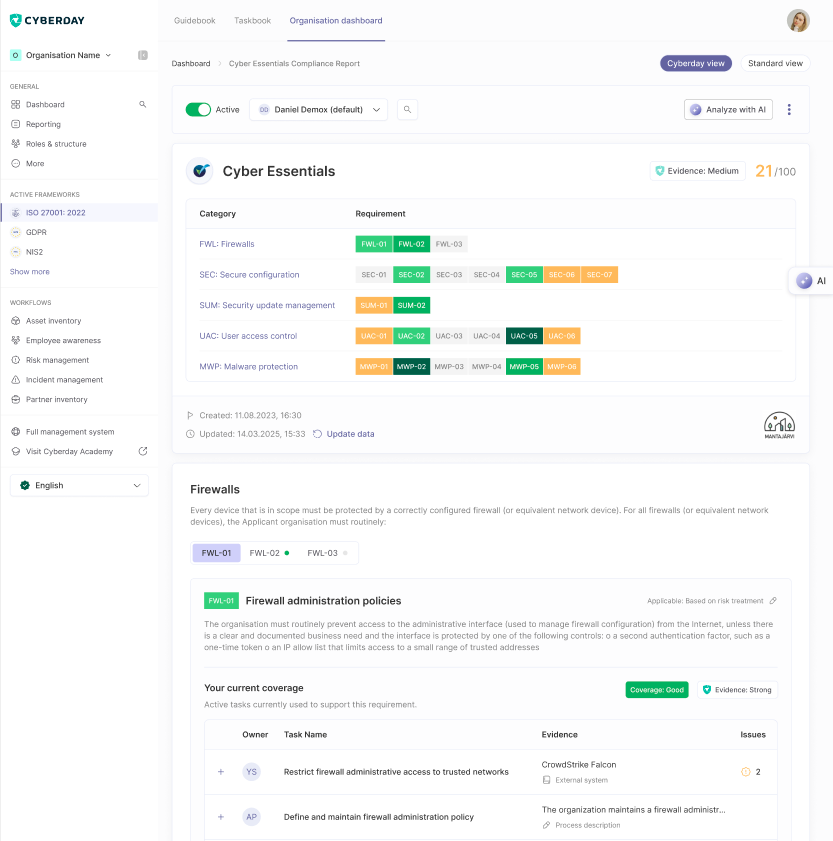
The old "X / Y tasks done" counter is being replaced by a coverage status - None, Partial, Adequate, or Strong - with a tooltip telling you what to do next. The reason: our tasks are best practice suggestions - representative patterns a typical implementation often uses, not a fixed list to always complete. The new status reflects whether coverage is actually in place and how strong it is, not how many of our suggestions you've ticked off. The judgment of whether Adequate is enough for a given requirement, or whether to harden to Strong, should often relate to your context and available resources.

Your tasks haven't gone anywhere - they're still listed under each requirement, still owned by the same people, still backing the same requirements.
What stays exactly the same
We've heard don't make me relearn the product loud and clear. Here's what isn't changing:
- Every task you've activated stays exactly where it is, owned by the same people.
- Every policy, every piece of documentation, every report — all preserved.
- All your active frameworks and your customisations to them — preserved.
And importantly: the pages you currently use aren't going away. What was previously on the Dashboard, and the All tasks, All documentation, and All guidelines views you've been reaching from the left menu, are all still fully available under the new Full management system section. If you have a routine that depends on those views - a search, a filter, a way of pulling together a list - it still works exactly as before. The new Dashboard and workflows become the default path through Cyberday; the existing paths remain as a parallel, complete surface for the work you already know how to do.
When and what you need to do
The change is rolling out gradually over the coming weeks. You'll see messages from the app when you arrive at the renewed views, that will present you the changes.
There's nothing you need to do to prepare.
Want a guided walkthrough and a chance to ask?
Join our webinar on Thursday 11th or June where we'll show the new Dashboard, the workflows, and the refined compliance view live — and answer your questions.
If you have feedback or questions in the meantime, don't hesitate to contact our support. We'd love to hear from you.

Workflows: the main change for you
This is the change you'll notice most - and the one that should make the ongoing work on your management system meaningfully easier.
Risk management. Employee awareness. Asset management. Incident management. Supplier management. Internal audits. These were already in Cyberday, but they were spread across themed lists, scattered documentation, and individual tasks. To get a complete picture of what was going on with, say, risks, you had to jump between several different views. Now each of these themes is a workflow - a hub that brings everything related together.
Open the Risk management workflow and you'll see, in one place: has your risk management work been active, any recommended actions to take now (e.g. active risks without an owner or active risks to check treatment status), the documentation that backs your risk process, the open work to attend to, and the reports auditors will ask for. No more hunting across the product to assemble the picture.
Each hub follows the same shape - header with status, the main metric for the theme, quick actions, documentation, tasks, reports - so once you've learned one, you know how to operate any of them. The catalogue covers 5 basic workflows, 5 advanced workflows and a few ones that pop up depending on your framework choices (e.g. privacy management, AI governance, etc.).
Dashboard - Answering the question: is our system working?
Open Cyberday and the first thing you'll see is the redesigned Dashboard - your unified view across every framework and workflow you've activated.
Framework cards at the top show your current compliance score and trend - and encourage you to access the framework compliance view to get the big picture perspective of the framework and continue improving compliance score - also for the non-workflow connected requirements.
Workflow cards below highlight what are the main ongoing parts of your system, where each workflow stands and what needs attention. Quick actions and improvement suggestions sit in context. Also for more experienced users, we want to answer better here to "what would need my attention" and give the place you return to between focused sessions of work.
The content that lived on the old Dashboard will move behind the "Full management system" -link on the left menu. This view is very important, if you have many frameworks active and wants to see the full output (e.g. all policies that have gotten created), or you want to review the whole system at once, outside the context of a specific framework or workflow.
Otherwise the left menu now highlights the compliance view and your active workflows more, so navigating to these main paths is smoother.
The compliance view, refined
Things our users have liked on the compliance view are unchanged - the prioritised, framework-by-framework picture, the per-requirement drill-down, the audit-ready evidence trail. The refinement is on the individual requirement cards.
The old "X / Y tasks done" counter is being replaced by a coverage status - None, Partial, Adequate, or Strong - with a tooltip telling you what to do next. The reason: our tasks are best practice suggestions - representative patterns a typical implementation often uses, not a fixed list to always complete. The new status reflects whether coverage is actually in place and how strong it is, not how many of our suggestions you've ticked off. The judgment of whether Adequate is enough for a given requirement, or whether to harden to Strong, should often relate to your context and available resources.
Your tasks haven't gone anywhere - they're still listed under each requirement, still owned by the same people, still backing the same requirements.
What stays exactly the same
We've heard don't make me relearn the product loud and clear. Here's what isn't changing:
- Every task you've activated stays exactly where it is, owned by the same people.
- Every policy, every piece of documentation, every report — all preserved.
- All your active frameworks and your customisations to them — preserved.
And importantly: the pages you currently use aren't going away. What was previously on the Dashboard, and the All tasks, All documentation, and All guidelines views you've been reaching from the left menu, are all still fully available under the new Full management system section. If you have a routine that depends on those views - a search, a filter, a way of pulling together a list - it still works exactly as before. The new Dashboard and workflows become the default path through Cyberday; the existing paths remain as a parallel, complete surface for the work you already know how to do.
When and what you need to do
The change is rolling out gradually over the coming weeks. You'll see messages from the app when you arrive at the renewed views, that will present you the changes.
There's nothing you need to do to prepare.
If you have feedback or questions, don't hesitate to contact our support. We'd love to hear from you.