


The compliance view is the place to see how you're doing against a specific framework — ISO 27001, NIS2, GDPR, Cyber Essentials, or any other framework you have active. It shows your status category by category, requirement by requirement, with concrete suggestions for the next moves that'll improve your score.
🆕 What's new: The compliance view has been refined to make next steps clearer per requirement. The biggest change is on each requirement's card — see Each requirement's coverage status below.
How to get there
Two natural entry points:
- From the Dashboard — click the Improve compliance button on any framework card at the top of the Dashboard
- From the left sidebar — open the Frameworks section, which lists each active framework as its own entry
Both paths lead to the same place.
What's on the page
The framework summary
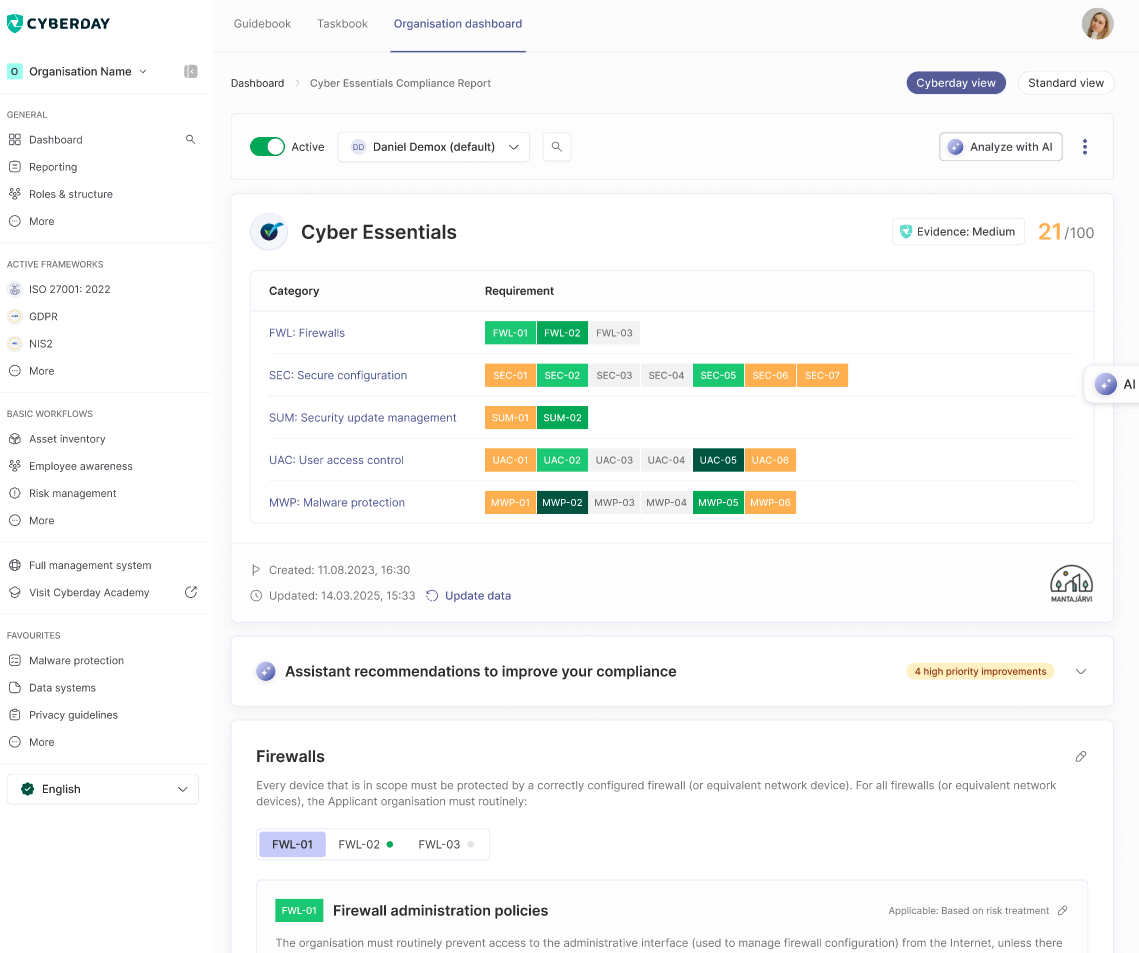
A header card for the framework shows the framework name (e.g. Cyber Essentials), an evidence quality badge (e.g. Evidence: Medium), and the current score out of 100. Below it, a category grid lists every category in the framework — for example FWL Firewalls, SEC Secure configuration, MWP Malware protection — with each individual requirement chip colour-coded by status, so you see at a glance where the gaps are.
Drill down to a category, then a requirement
Clicking a category opens its detail view — the category description, a strip of requirement chips, and the selected requirement's full card with its title (e.g. FWL-01 — Firewall administration policies), the Applicable: Based on risk treatment annotation, and the full requirement text. Audit-trail metadata sits underneath: Created and Updated timestamps, plus an Update data link.
Requirement specific view and coverage-based recommendations
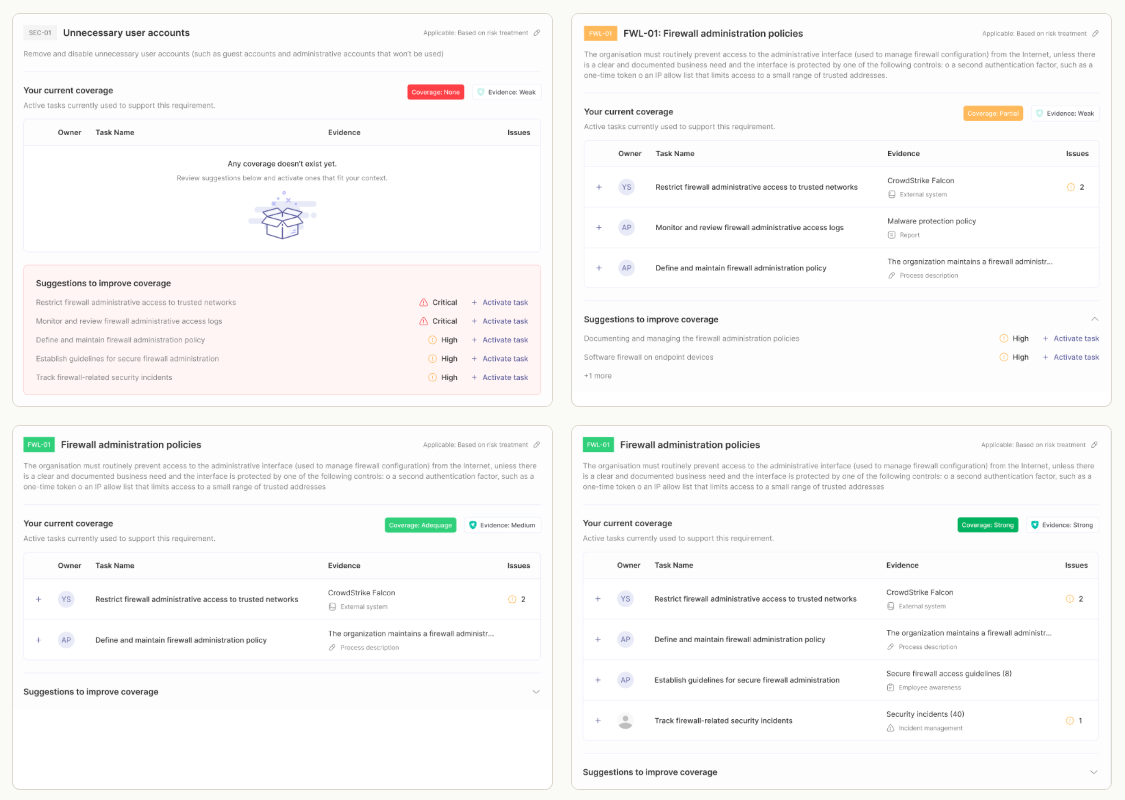
This is the biggest change in the redesign. Each requirement card now carries a coverage status in the top right — one of four levels, with a tooltip telling you what to do next.
- None — "Review suggestions below and activate ones that fit your context." No active tasks support this requirement yet. The card surfaces the Suggestions to improve coverage list, sorted by criticality.
- Partial — "Continue implementation by finishing active tasks or adding suggested ones." Some active tasks are in place but there are still meaningful gaps. Both the current coverage list and the suggestion list are visible.
- Adequate — "Judge whether this implementation is appropriate or if you need to harden it." Enough tasks are in place that the requirement is reasonably covered, but the implementation may still be light for your risk appetite. The suggestion list collapses behind a header, so you can decide whether to harden or move on.
- Strong — "Requirement seems thoroughly implemented." Multiple well-documented tasks with strong evidence sources are in place. The next action shifts from "add more" to "maintain".
Our tasks are best practice suggestions, representative patterns a typical implementation often uses, not a fixed list to check off. The coverage status reflects whether coverage is actually in place and how strong it is, not how many of our suggestions you've ticked off. The judgment of whether Adequate is enough for a given requirement, or whether to harden to Strong, should often relate to your context and available resources.
When the coverage is none, that means that no active tasks support the requirement yet and the suggestions to improve are highlighted. At partial coverage, a few tasks are already active, but there are still some compliance gaps. At adequate coverage, the requirement is well covered, but it can be decided that this level is not yet enough, in which case strengthening to strong coverage to completely address the requirement would be the best option.
Tasks in context — "Your current coverage"
Under each requirement, the Your current coverage block surfaces the active tasks currently supporting it — with owner, task name, evidence source (e.g. CrowdStrike Falcon — External system, Process description), and an issues count. Below it, Suggestions to improve coverage lists tasks Cyberday's AI recommends activating.
How it connects to the rest of Cyberday
The compliance view and the workflows are partners, not competing surfaces. Workflow-shaped requirements (risk management, awareness, incident handling, audits, continuity testing) have a workflow as their natural home — the workflow page owns the day-to-day activity, and the compliance view reflects the resulting status. Atomic requirements (e.g. "MFA enforced on admin accounts", "Backups encrypted at rest") live directly under the requirement card here.
Questions and feedback
Do you have any further questions, would need another help article or would like to give some feedback? Please contact our team via team@cyberday.ai or the chat box in the right lower corner.


