


Incident management is the workflow for capturing, classifying, responding to, and learning from information security incidents. Everything tied to incidents — the live incident list, response plans, related tasks, and reports — lives on one focused page.
🆕 What's new: The Incident management workflow brings together what used to be spread across themed lists. Your existing incidents, owners, and response plans are all here, exactly as they were — just on one focused page.
Setting it up
If you haven't run the guided setup yet, do that first. It's a short flow that takes you through:
- Who leads incident response? Typically your incident response role, which can be a single user or many. The lead is responsible for triaging new reports and coordinating the response.
- Incident reporting via Guidebook? Confirm whether you want employees to report new incidents via Guidebook.
- Other people to notify of incidents - Select othet people to notify of new incidents, on top of the owner.
- Lessons learned - Confirm whether you want a separate "lessons learned" section enabled on documentation for each incident.
You can also configure the workflow manually on the page — the guided version just gets you to a working state in minutes.
What's on the page
Main metrics
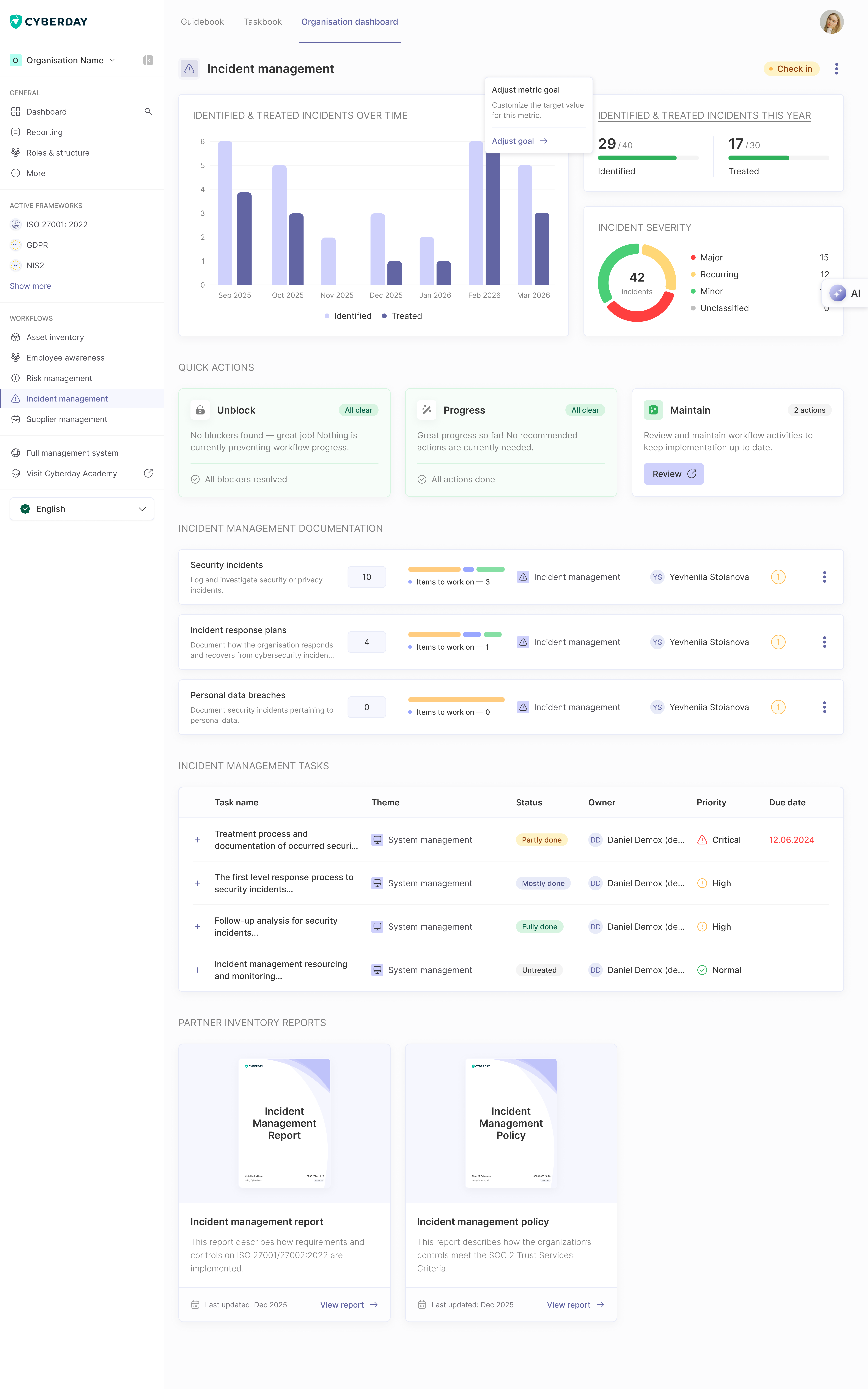
The header carries three views of how your incident management is doing:
- Identified & treated incidents over time — a monthly trend chart of new incidents identified vs treated
- This year, against your goals — e.g. 29 / 40 identified, 17 / 30 treated
- Severity breakdown — a donut showing total incidents with slices for Major / Recurring / Minor / Unclassified
Actions to focus on
A prioritised list of what to handle next, grouped into three buckets:
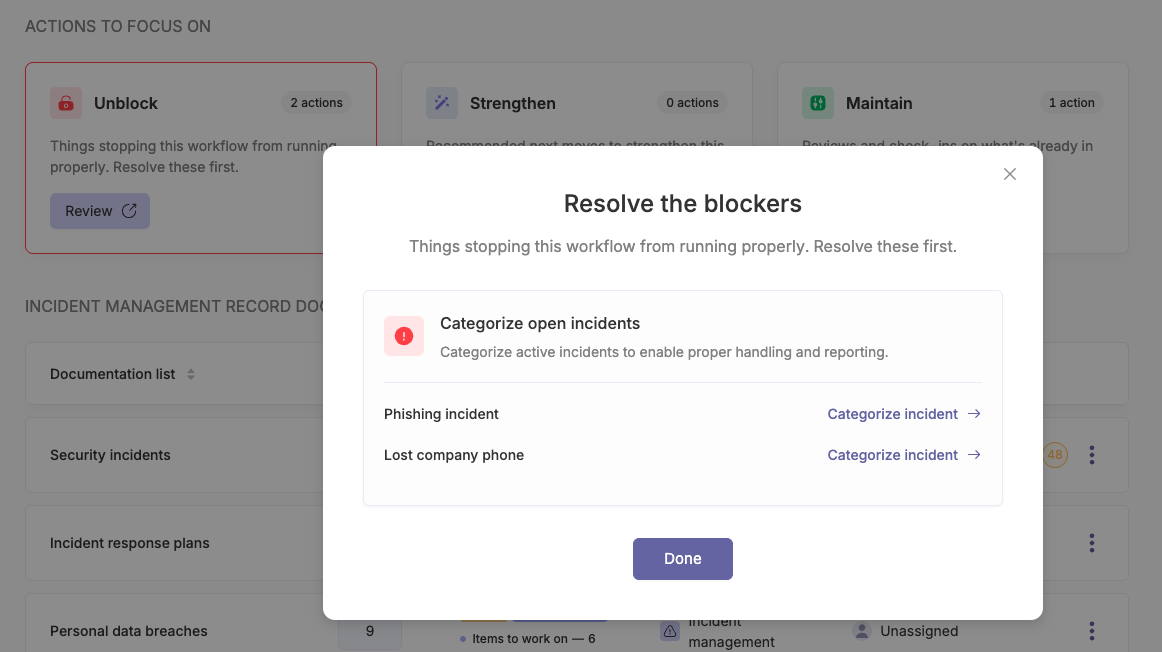
- Unblock — issues stopping the workflow from running properly. Typical items for Incident management: Document your first incident, Open incident with no categorization, and Review active incidents.
- Strengthen — recommended next moves to make this workflow more robust. Items like Document more incidents and Add incident reporting guidelines (which routes you to the Guidelines section of Incident management).
- Maintain — scheduled reviews and check-ins on what's already in place. For Incident management, that's primarily Review recent incidents for lessons learned.
Clicking into a bucket opens a focused list — you can resolve, refine, or check off each item without leaving the workflow page.
Documentation
The documentation that backs your incident management practice:
- Security incidents — log and investigate security or privacy incidents
- Incident response plans — how the organisation detects, responds to, and recovers from incidents
- Personal data breaches — incidents involving personal data, with regulator-notification timelines surfaced
Each documentation row shows the total item count, items still to work on, the related ISMS theme, and the responsible owner — so you can see at a glance where attention is needed.
Tasks
Below the documentation, the workflow page lists the operational tasks — for example, treatment process and documentation of incidents, first response process for security incidents, follow-up analysis for security incidents, and incident management resourcing. Each task shows its theme, status (Untreated / Partly done / Mostly done / Fully done), owner, priority (Low / Normal / High / Critical), and due date. Overdue tasks are highlighted so you know where to act first.
Reports
The audit-ready outputs Incident management produces:
- Incident management report — describes how the organisation has detected, classified, and resolved incidents over the reporting period, including major and recurring incidents
- Incident management policy — describes how the organisation defines, detects, and responds to security incidents, and the roles and escalation paths involved
Each report card shows a cover preview, the Last updated date, and a View report link. Reports refresh from your live data, so they're always current.
How it connects to other workflows
Lessons learned from incidents feed into Continuous improvement. Severe incidents often generate new risks in Risk management or trigger a test in Continuity planning. Regulatory reporting obligations tied to active frameworks (NIS2, GDPR, etc.) show up in the Compliance view alongside the requirements they answer.
Questions and feedback
Do you have any further questions, would need another help article or would like to give some feedback? Please contact our team via team@cyberday.ai or the chat box in the right lower corner.


