


Asset inventory is the workflow for keeping a current, owned, prioritised inventory of the assets your organisation depends on — data systems, data sets and stores, offices and physical locations, personnel, and other assets. The focus isn't individual devices; it's the systems and information flows that matter to your security management. This is the foundation almost every other workflow refers back to.
🆕 What's new: The Asset inventory workflow brings together what used to be spread across themed lists. Your existing assets, owners, and classifications are all here, exactly as they were — just on one focused page.
Setting it up
If you haven't run the guided setup yet, do that first. It's an AI-assisted flow that helps you go from zero to a meaningful starter inventory:
- Freely name your first data systems. For example "Microsoft 365, Salesforce, our internal HR tool...". Cyberday's AI enriches this content to start your asset inventory.
- Name your first data assets. Customer data, personnel data. Cyberday's AI helps you identify related data sets and get your first data assets identified.
- Continue to assigning owners and priorities. Each asset needs an owner and priority (critical / high / medium / low) - these help the rest of the system work out what to focus on.
The workflow goes to running with a meaningful starter inventory rather than an empty list. You can also configure manually on the page if you'd rather not use the guided setup.
What's on the page
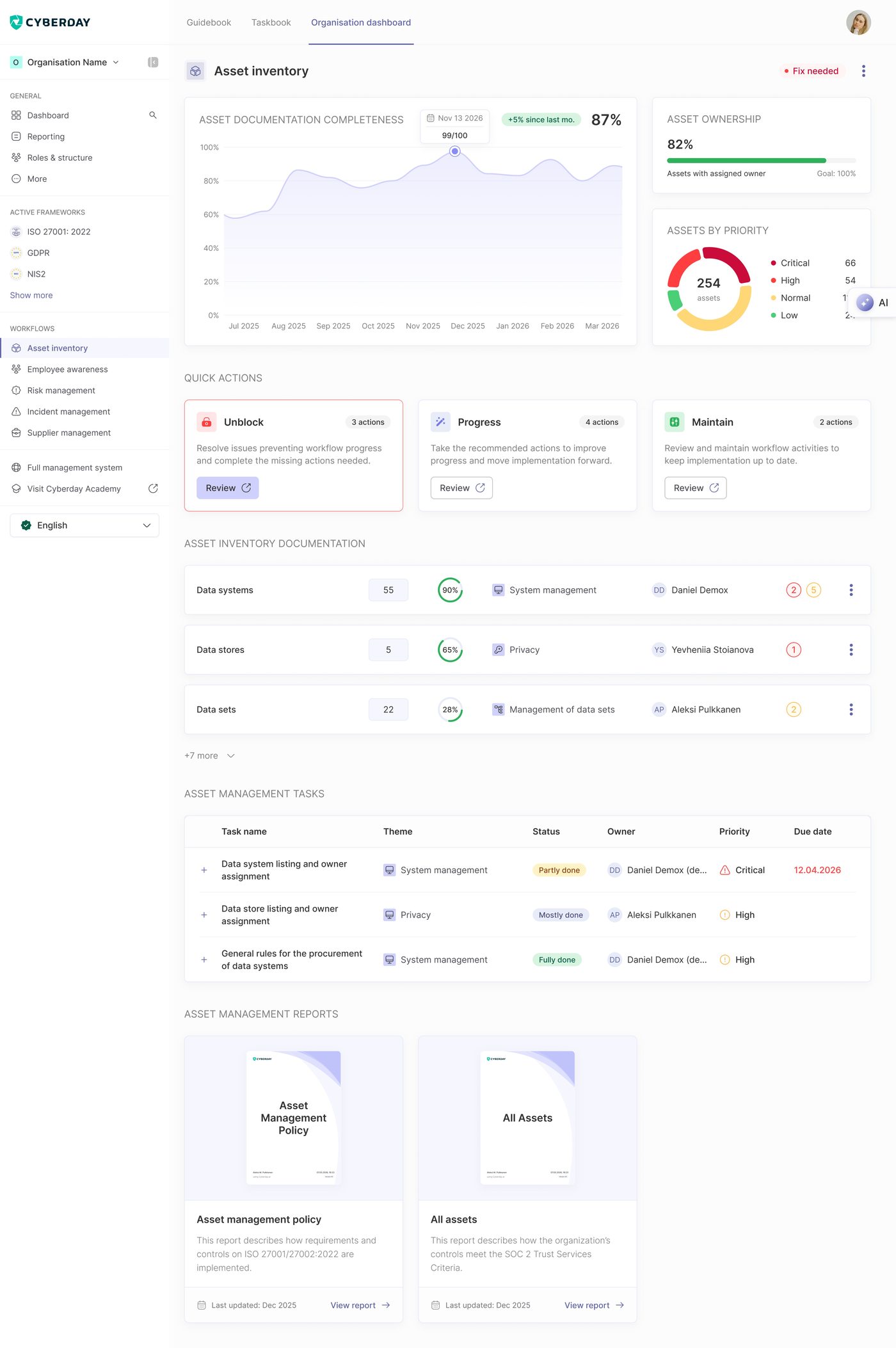
Main metrics
The header carries three views of how complete and current your inventory is:
- Asset documentation completeness — % of assets with the required fields filled in
- Asset ownership — % of assets with an owner assigned
- Assets by priority — distribution across critical / high / medium / low
Actions to focus on
A prioritised list of what to handle next, grouped into three buckets:
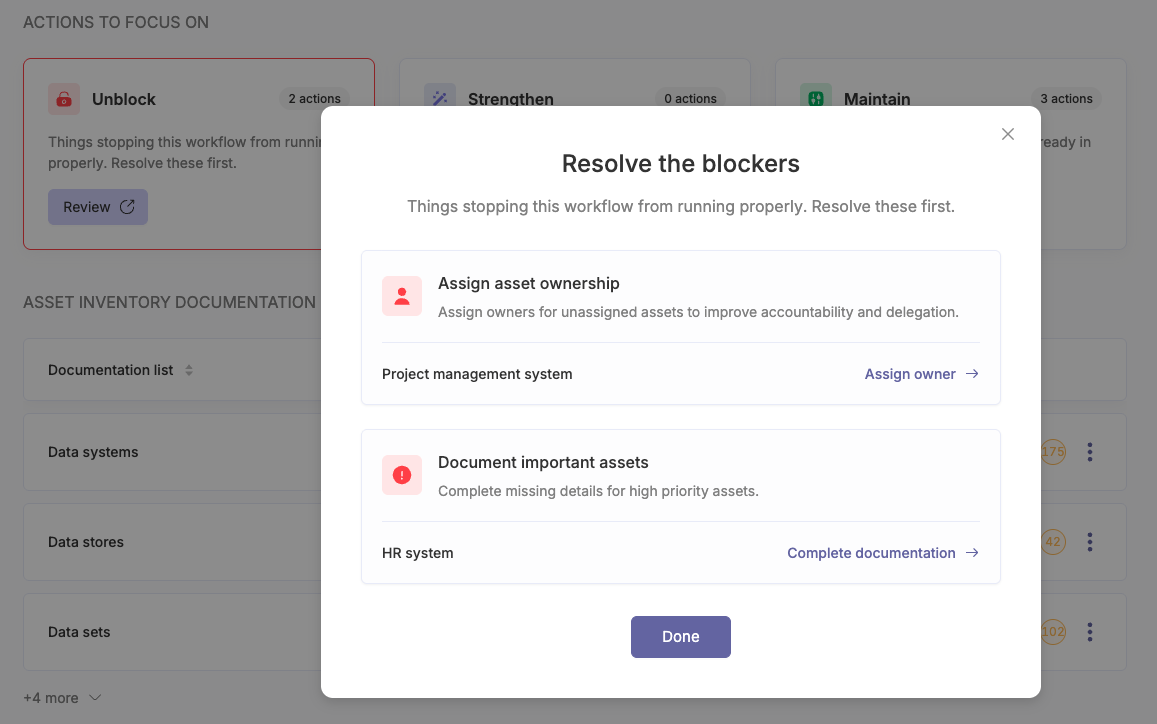
- Unblock — issues stopping the workflow from running properly. For Asset inventory: Asset without an owner and High priority assets with no documentation.
- Strengthen — recommended next moves to make this workflow more robust. Items like Add more systems (when you have fewer than 10), Add assets to empty lists (e.g. Offices = 0), and Link systems to providers (when those links are missing).
- Maintain — scheduled reviews and check-ins on what's already in place. Review system owners, Review system priorities, and Review data stores.
Clicking into a bucket opens a focused list — you can resolve, refine, or check off each item without leaving the workflow page.
Documentation
The inventory is organised by asset category, not as a single flat list. Each category shows count, documentation completeness, owner, and the related ISMS theme. The default categories are:
- Data systems — the applications and services your operations run on
- Data stores — databases, file shares, repositories where data lives
- Data sets — the specific data collections you handle (customer data, employee data, etc.)
- Offices & physical locations — sites that fall in scope
- Other assets — devices, services, and the rest
Tasks
Below the documentation, the workflow page lists the operational tasks tied to asset inventory — owner assignment, documentation upkeep, category-level reviews. Each task shows its theme, status (Untreated / Partly done / Mostly done / Fully done), owner, priority (Low / Normal / High / Critical), and due date. Overdue tasks are highlighted so you know where to act first.
Reports
The audit-ready outputs Asset inventory produces:
- Asset management policy — describes how the organisation identifies, classifies, and manages its assets
- All assets — the full current inventory across every category
Reports refresh from your live data, so they're always current.
How it connects to other workflows
Asset inventory sits underneath most of the rest of the ISMS. Risks in Risk management typically attach to assets. Suppliers in Supplier management tie to the systems and data they support. Incidents in Incident management often reference the asset that was affected.
Questions and feedback
Do you have any further questions, would need another help article or would like to give some feedback? Please contact our team via team@cyberday.ai or the chat box in the right lower corner.


